Showing posts with label RAW image processing. Show all posts
Showing posts with label RAW image processing. Show all posts
Sunday, May 22, 2011
How to Edit RAW Files in Lightroom - Quick Tips - How to See Just Your Video Files
How to Edit RAW Files in Lightroom - Quick Tips - How to See Just Your Video Files
If you'd like to see me do a video on how I would edit one of your RAW files, or you'd like a photo critique of your photos, you can email them to theartoftheimage@gmail.com. No more than 5 per person please. :-)
Get in on Exclusive Offers and Promotions as well as VIP Only Tips and Reviews! Sign up NOW for our FREE VIP Newsletter at
http://www.artoftheimage.com


Saturday, May 21, 2011
How to Edit RAW Files in Lightroom - Quick Tip - Hiding the Side Panels for Maximum Viewing
How to Edit RAW Files in Lightroom - Quick Tip - Hiding the Side Panels for Maximum Viewing
If you'd like to see me do a video on how I would edit one of your RAW files, or you'd like a photo critique of your photos, you can email them to theartoftheimage@gmail.com. No more than 5 per person please. :-)
Tuesday, May 17, 2011
Editing RAW Files in Adobe Lightroom - How to Get Your Photos to Look Like They Did On Your Camera
A lot of people ask me how to get their RAW files to look like they did on the back of the camera. They open them up in Lightroom or another RAW converter, and the image doesn't look like it did on their camera's LCD. Here's why that happens and how fix it.
If you'd like to see me do a video on how I would edit one of your RAW files, or you'd like a photo critique of your photos, you can email them to theartoftheimage@gmail.com. No more than 5 per person please. :-)
Monday, May 16, 2011
How to Get Maximum Highlight and Exposure Recovery from RAW Files in Lightroom 3
How to Get Maximum Highlight and Exposure Recovery from RAW Files in Lightroom 3.
If you'd like to see me do a video on how I would edit one of your RAW files, or you'd like a photo critique of your photos, you can email them to theartoftheimage@gmail.com. No more than 5 per person please. :-)
Tuesday, July 7, 2009
Lightroom vs Canon DPP
Since I posted my Lightroom vs Nikon Capture / Nikon View article, I've had quite a few inquiries about my thoughts on Lightroom vs Canon's DPP (Digital Photo Professional) software.
I always liked DPP when I worked with it. It was very easy to work with (once you got the workflow figured out) and capable of delivering excellent quality RAW develops from Canon CR2 files. (for those that missed it, here's the link to my previous article on using Canon DPP.)
So I got to thinking that an actual comparison between Lightroom and DPP was in order.
Overall, my thoughts on comparing the RAW develops from each are very similar to the Lightroom vs Nikon comparison I did. In general, DPP does a better job right out of the gate with no tinkering.
You can get the same results, or very close, from Lightroom, but DPP provides a beautiful result right out of the camera as it were.
Between DPP and Lightroom, sometimes I liked the DPP file slightly better, and sometimes I liked the Lightroom file a little better. I used the Camera Standard profile in Lightroom, so the results were always pretty close (once I turned off my own presets).
That's the big thing that's changed since I used DPP a lot. Lightroom introduced camera profiles, and they do an excellent job of giving you the same or similar results as you would have got with a straight out of camera jpg or with the Canon software.
My conclusion here would be that DPP is great for quick and easy RAW to jpg conversions without having to tinker. Lightroom can take some tinkering to get an equally good result, but it's much better now that we have the camera profiles available.
Lightroom can match or come VERY close to Canon's DPP in quality when it comes to developing RAW CR2 Canon files. When it comes to workflow, speed, and versatility, Lightroom just blows Canon DPP away, although not as bad as it does Nikon. DPP is much more usable than the Nikon software.
Let's look at a couple images to see the results.
These are all from RAW files, developed as is with no adjustments (except a small exposure correction in a couple of them).
Lightroom 2 develops were set to Camera Standard as that was my default camera setting with my Canon DSLR's. DPP already defaults to the camera setting and does not need to be set in the software.
All the images have been saved at 800 pixels on the long side. The images aren't posted for pixel-peeping, only to show the basic differences between the Lightroom and DPP RAW develops. Please don't email with complaints about pure testing methods and such... that's not why I posted these.
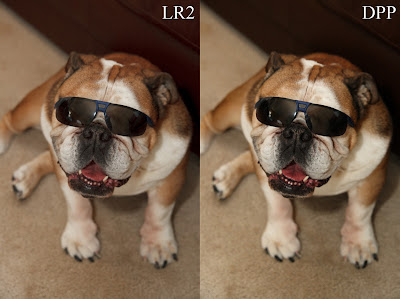
Here's my bulldog Hyla, posing for the camera (Canon 30D) with a pair of sunglasses on. In this instance, DPP rendered the contrast and tones a little punchier than Lightroom did.
I actually like the DPP shot better, but I can get the same thing out of Lightroom very easily. For a quick and easy develop with no tinkering, I have to say DPP beat Lightroom here.
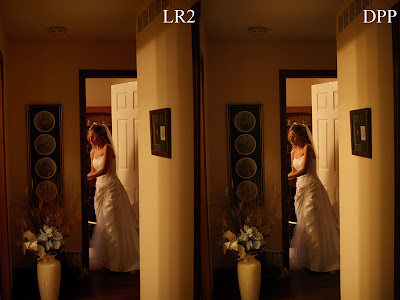
Here's a shot of a bride from a wedding I shot with a Canon 20D. Both are very similar, but I have to give the edge to the DPP develop.
Again, I could've got the same look in Lightroom very quickly, but DPP rendered this beautifully with no tinkering.
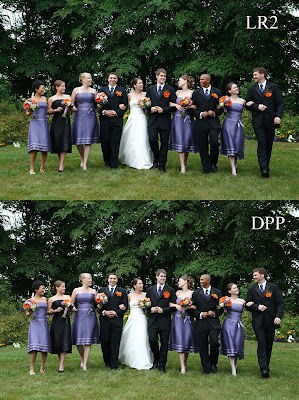
This bridal party shot (Canon Rebel XTi) is so close I almost wouldn't call a winner.
On close inspection in Photoshop, I'm going to give a slight nod to DPP, but it's so close it's probably more appropriate to call it a draw. Lightroom does an excellent job here.
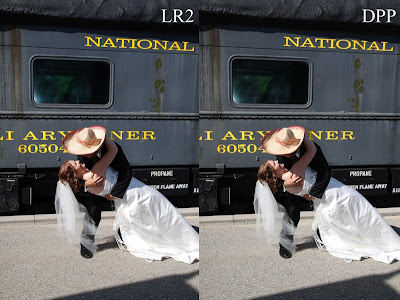
This shot (Canon Rebel XTi) of a bride and groom with a train in the background is a tie. I can't even tell the difference in Photoshop without really studying it. Even then, neither is better than the other. Lightroom matches DPP quality here.
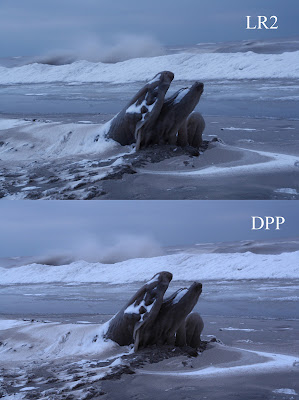
This photo of the Lake Erie shoreline in winter (Canon 30D) is, again, very close. I actually think Lightroom won this one by a slight margin, because I prefer the detail rendering Lightroom did, especially in the log on the shore.
Again though, they're so close it's hard to call a winner. Lightroom does a great job with color and kudos for the better detail rendering.
It's worth noting that DPP doesn't demand as much from your computer as Lightroom does. Lightroom likes as much power as you can give it, while DPP runs quite comfortably on a less than top of the line machine.
DPP is a valid alternative to Lightroom if you don't want to spend the money on Lightroom. Workflow isn't as good or as fast as Lightroom's, but it's still very usable. I used to use DPP as my primary RAW conversion software for a year or more.
If you're a Lightroom convert like myself, consider using DPP when you're having trouble getting an image just right in Lightroom. You may be surprised how good it looks in DPP without having to make any adjustments at all.
Feel free to post a comment and let me know your experiences with DPP.
If you don't have Adobe Photoshop Lightroom 2 , Amazon usually has the best price.
See you behind the camera!
Matt
Canon DPP Workflow & FREE E-book
How to Thrive as an Artist Without Selling Out:
The Unconventional Guide to Art and Money
I always liked DPP when I worked with it. It was very easy to work with (once you got the workflow figured out) and capable of delivering excellent quality RAW develops from Canon CR2 files. (for those that missed it, here's the link to my previous article on using Canon DPP.)
So I got to thinking that an actual comparison between Lightroom and DPP was in order.
Overall, my thoughts on comparing the RAW develops from each are very similar to the Lightroom vs Nikon comparison I did. In general, DPP does a better job right out of the gate with no tinkering.
You can get the same results, or very close, from Lightroom, but DPP provides a beautiful result right out of the camera as it were.
Between DPP and Lightroom, sometimes I liked the DPP file slightly better, and sometimes I liked the Lightroom file a little better. I used the Camera Standard profile in Lightroom, so the results were always pretty close (once I turned off my own presets).
That's the big thing that's changed since I used DPP a lot. Lightroom introduced camera profiles, and they do an excellent job of giving you the same or similar results as you would have got with a straight out of camera jpg or with the Canon software.
My conclusion here would be that DPP is great for quick and easy RAW to jpg conversions without having to tinker. Lightroom can take some tinkering to get an equally good result, but it's much better now that we have the camera profiles available.
Lightroom can match or come VERY close to Canon's DPP in quality when it comes to developing RAW CR2 Canon files. When it comes to workflow, speed, and versatility, Lightroom just blows Canon DPP away, although not as bad as it does Nikon. DPP is much more usable than the Nikon software.
Let's look at a couple images to see the results.
These are all from RAW files, developed as is with no adjustments (except a small exposure correction in a couple of them).
Lightroom 2 develops were set to Camera Standard as that was my default camera setting with my Canon DSLR's. DPP already defaults to the camera setting and does not need to be set in the software.
All the images have been saved at 800 pixels on the long side. The images aren't posted for pixel-peeping, only to show the basic differences between the Lightroom and DPP RAW develops. Please don't email with complaints about pure testing methods and such... that's not why I posted these.

Here's my bulldog Hyla, posing for the camera (Canon 30D) with a pair of sunglasses on. In this instance, DPP rendered the contrast and tones a little punchier than Lightroom did.
I actually like the DPP shot better, but I can get the same thing out of Lightroom very easily. For a quick and easy develop with no tinkering, I have to say DPP beat Lightroom here.

Here's a shot of a bride from a wedding I shot with a Canon 20D. Both are very similar, but I have to give the edge to the DPP develop.
Again, I could've got the same look in Lightroom very quickly, but DPP rendered this beautifully with no tinkering.

This bridal party shot (Canon Rebel XTi) is so close I almost wouldn't call a winner.
On close inspection in Photoshop, I'm going to give a slight nod to DPP, but it's so close it's probably more appropriate to call it a draw. Lightroom does an excellent job here.

This shot (Canon Rebel XTi) of a bride and groom with a train in the background is a tie. I can't even tell the difference in Photoshop without really studying it. Even then, neither is better than the other. Lightroom matches DPP quality here.

This photo of the Lake Erie shoreline in winter (Canon 30D) is, again, very close. I actually think Lightroom won this one by a slight margin, because I prefer the detail rendering Lightroom did, especially in the log on the shore.
Again though, they're so close it's hard to call a winner. Lightroom does a great job with color and kudos for the better detail rendering.
It's worth noting that DPP doesn't demand as much from your computer as Lightroom does. Lightroom likes as much power as you can give it, while DPP runs quite comfortably on a less than top of the line machine.
DPP is a valid alternative to Lightroom if you don't want to spend the money on Lightroom. Workflow isn't as good or as fast as Lightroom's, but it's still very usable. I used to use DPP as my primary RAW conversion software for a year or more.
If you're a Lightroom convert like myself, consider using DPP when you're having trouble getting an image just right in Lightroom. You may be surprised how good it looks in DPP without having to make any adjustments at all.
Feel free to post a comment and let me know your experiences with DPP.
If you don't have Adobe Photoshop Lightroom 2
, Amazon usually has the best price.See you behind the camera!
Matt
Canon DPP Workflow & FREE E-book
How to Thrive as an Artist Without Selling Out:
The Unconventional Guide to Art and Money
Wednesday, April 29, 2009
Canon to Nikon: How I Learned To Stop Worrying And Love The Switch

My friend Brian Tao, a great photographer who's also one of the smartest tech guys I know, just switched to Nikon after years of shooting only Canon. He's graciously agreed to let me post the article he wrote about the switch, so enjoy!

That's Mihkel Fortey trying to help me decide between the 5D Mark II and the D700. I've been a Canon shooter almost all of my professional life, but for the first time, I felt Nikon might have a product that better suits me. I currently shoot with a pair of 40D's, so the first question was whether I needed to upgrade at all. If "yes", the second question was whether I stuck with Canon or switched to Nikon.
I've meditated upon this decision for many months now, aware of the costs of switching, aware of the "grass is greener" syndrome, aware that I had to balance my personal lust for new toys with the responsibility of running a business, and always remembering that none of my past clients ever expressed any concern over the type of equipment I used.
This will turn out to be a very long post, but I'm not going to type it all out at once, since I will undoubtedly forget to cover a point or miss a detail somewhere. So I'll just start with why I felt a decision had to be made, and the major influences of that decision.
It used to be that digital cameras suffered from poor battery life, slow response times, insufficient pixel resolution, a small shot buffer, unnatural colour, etc. One by one, the technical limitations fell away. Now, only two major ones remain for me: AF performance and ISO noise. I can never have too much of the former, nor too little of the latter. Problems with battery life, pixel count, colour rendition, and so on have all been more than adequately solved for my needs.
For the most part, I have been happy with the AF performance of my 40D. I used the center point 90% of the time, and kept a 580EX II in the hotshoe to help out in low light situations. Paired with the right lenses (notably my 135 f/2L and 17-55 f/2.8 IS), I was able to get good, sharp photos. It wasn't 100%, but close enough that no important shots were ever missed.
ISO noise was also quite respectable. I would often shoot at 1600 and, properly exposed, would get some great images. I like the noise characteristics of the 40D, with no visible banding or pattern noise until I'm reaching up to ISO 3200 pushed 1 or 2 stops.
But as I said, I can always use better AF and less noise.
The obvious successors to my 40D were the 5D Mark II and the D700. The 5D2 was the comfortable choice. Buy two new bodies, and away I go. Same lenses (mostly), same speedlites, same controls, same ergonomics. Yet at the same time, the reasons why I went with Canon over Nikon 7 years ago no longer held true. Nikon had caught up (if not surpassed) Canon on several fronts. I had always recognized the strong points of the Nikon system, but I think the introduction of the D3 (and then D700) was a watershed moment that allowed Nikon to finally take the final crown: image quality.
I'll skip the details for now, but I studied everything from the cameras themselves, to the lens lineups of both companies, to their product roadmap and their marketing strategies. I had plenty of hands-on evaluation with both cameras (thanks to many DWF'ers who lent me their gear). In the end, I had to give the D700 the edge over the 5D2, but perhaps not for the reasons most people would expect.
Image quality and AF performance were remarkably even. The Canon was better in some areas, while the Nikon excelled in others. It would have been a very difficult decision had I only considered those points.
In the end, I decided that switching to Nikon would be the best long-term move for two entirely different reasons: confidence in one's equipment, and the company's product development philosophy. I won't rehash everything here, but read Brett's thread about what happens when you can't trust your gear:
[private DWF link omitted] - {http://www.digitalweddingforum.com}
But what do I mean by "product development philosophy"? Both Canon and Nikon produce gear that is used daily by tens or hundreds of thousands of professionals. There is no arguing they know the business, and they know what it takes to succeed as an equipment manufacturer. But as an outsider, I suspect that these two companies go about things very differently.
I have long noticed that Nikon seems to introduce more useful features and functions that go unanswered by Canon, rather than the other way around. I'm not talking about video capability, Live View, AF microadjustment, high-res LCD screens, etc. Those are the headliner features, and both companies have developed them to stay competitive. No, I'm talking about the smaller, sometimes unnoticed things.
I'll expound more on this later, but the basic gist is this: there are more settings and configurable options on the D700 than on any Canon I've used, 1 series included. And for settings that are on both cameras, Nikon tends to allow more flexibility in the settings. I may not need all those settings, and I may not even understand the utility of some settings... but I appreciate that Nikon gives me more ways to customize the camera's operation than Canon.
The second part of the philosophy question has to do with their product lineup. Canon is very good at maintaining clear, distinct lines between their various camera models. They save the best features for the 1 series cameras, and remove features as you move down to the 5's, 10's and Rebel series. Canon does not believe in putting "pro" features in a "non-pro" camera... I mean, if they made the 50D too good, nobody would have a reason to go with a 1D Mark III, right?
Nikon seems to be less concerned about product differentiation. Are they crazy for putting the D3's sensor and AF module in the D700, then selling it for $1500 less? I know when I looked at both, I really couldn't see much justification to pony up for the D3. The D700 already has most of the important parts!
I think this is due in part to Nikon not "dumbing down" their cameras to fit a product line, the way Canon does. Example: why is the 40D limited to +/- 2 stops of bracketing in 3 shots? The 1 series can do +/- 3 stops with 2, 3, 5 or 7 shots. The D700 can do +/- 5 stops with 2 to 9 shots. The difference is only in software. Example: the D700 has a built-in intervalometer. None of Canon's DSLRs have that feature... oh, but their cheap point-and-shoots do! Again, that is a software feature... the hardware is perfectly capable of doing it.
And then you get into the more significant capabilities. Wireless commander mode on the Nikons is a perfect example. The built-in pop-up flash on the D700 can control multiple off-camera speedlites. That is an amazing feature! Now I can travel with one body and one flash, and still have the option of doing some quick off-camera lighting. With the Canon, I either have to pack two speedlites, or a speedlite and an ST-E2. That then requires a bag or pouch of some sort, instead of just hanging the camera around my neck and nothing else.
So in the end, I feel that Nikon's philosophy results in a better feature set at a lower price point than Canon. I can understand Canon's desire for product differentiation, but as a consumer I appreciate Nikon's approach more. With Canon, I feel they are deliberately crippling their cameras to "encourage" people to buyer a higher-end model than they otherwise need. Canon says "we would rather you buy a 1D Mark III instead of a 50D". Nikon says "it doesn't matter whether you buy a D700 or D3, we still get your dollars".
Earlier today, I called my local camera dealer and put in an order for a D700, 24-70/2.8, MB-D10 grip, a couple extra EN-EL3a's, and an SB-900. I'll start with that, and then decide how to outfit a second D700 later. I will be picking up everything except the lens tomorrow.
Brian also runs a RAW image file processing company called Raw Pudding. If you're tired of doing your own RAW processing and are looking for another option, check it out! Prices are reasonable and quality is excellent. Brian will basically analyze your "look" and "style" and process your files to look like you did them. How cool is that!
Subscribe to:
Posts (Atom)